I must admit, I am someone who finds it almost impossible to pass on a really good deal when grocery shopping. If I have the freezer space, the bargain item is coming home with me. Which creates a unique problem when it comes time to decide what to cook for dinner. Half the time I have no idea what I have..
The short version: Instead of planning specific meals for specific days, make a menu of everything you could cook from what’s in the house, like a restaurant menu stuck on your fridge. When it’s time to eat, you pick from the list instead of staring into the fridge trying to think. Start by writing down what you have, sort it into meals you’d actually make, lay it out as a menu, and cross things off as you go. There’s a free template if you want a head start. Continue reading for the longer version.
I’ve tried to solve this problem with meal planning, but I struggle with the concept of knowing on Sunday what I’m going to feel like eating next Thursday. Also when I do try to meal plan, it tends to fall apart the first time the week doesn’t go to plan. If I planned chicken stir fry for Tuesday, but by Tuesday evening I don’t feel like stir fry, or someone unexpected stayed for dinner, or I looked at the recipe and decided no thanks, it feels like the whole week’s plan needs rewriting. So by Wednesday I’m considering opening up the delivery apps, because picking from a list feels easier, even though it blows the budget.
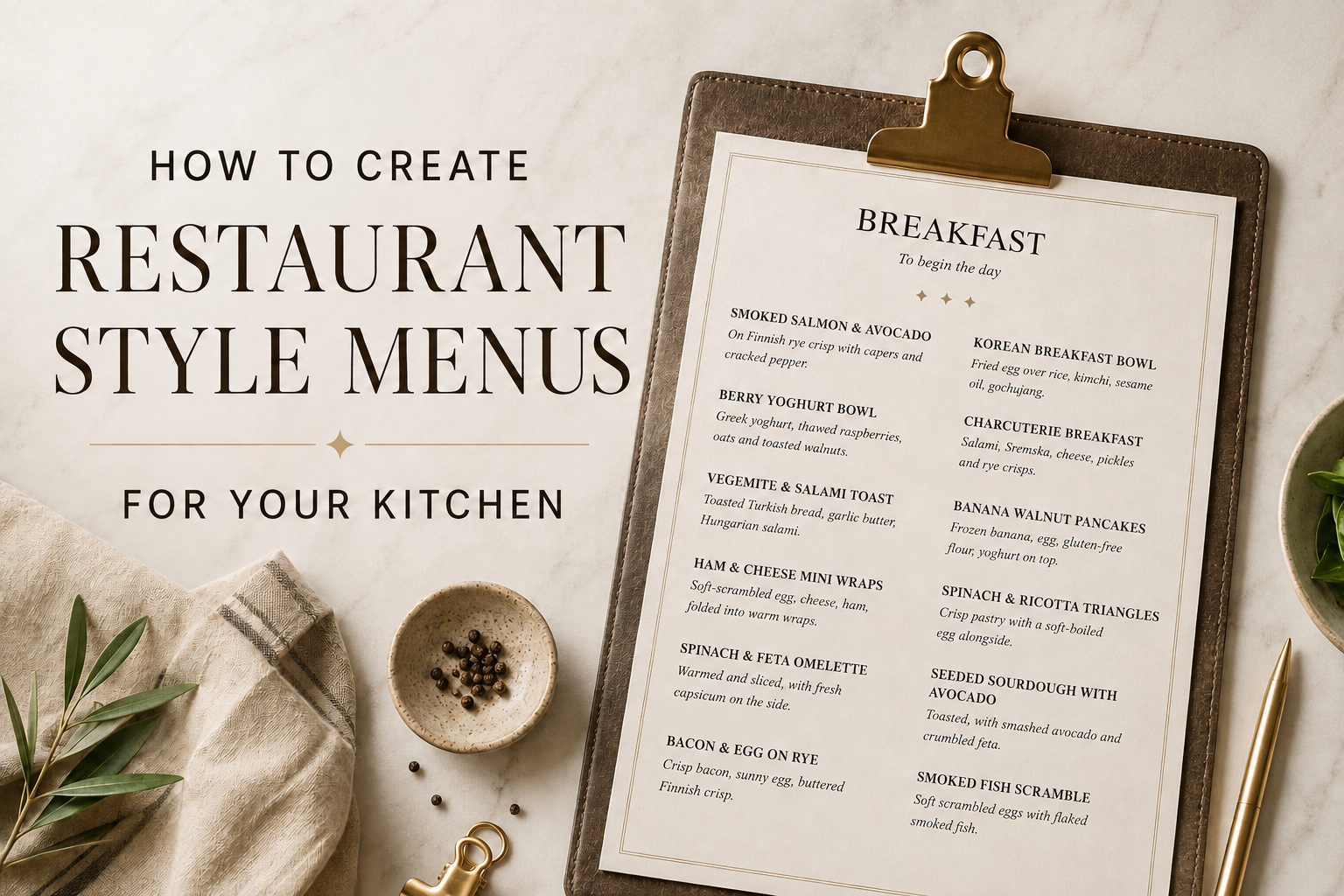
Something that I found worked better for me is a kitchen menu. A printed list of meals I can actually make from ingredients available in the house. When it’s time to eat, we look at the menu, choose something and cook it. If you also cook for other people, hand them the menu when they ask what’s for dinner. You stop being the household memory of what’s in the fridge, which is a bigger relief than it sounds.
If you think you could use this idea, here’s how to set one up.
Step 1: Take stock of what’s actually in your kitchen
For me this is probably the hardest part of the whole thing but once it’s done once it is easier to keep it updated.
The straightforward version is to open the fridge, freezer, and pantry and write everything down on paper or in a note on your phone.
If that sounds too time consuming here are some ways you could try to make this part easier.
Take photos. Open the fridge, snap a photo of each shelf. Same with the freezer and pantry. You can write the list later from the photos. Or you can upload the photos to an AI tool like ChatGPT or Claude and ask it to list everything it can see. It won’t catch everything, especially small items at the back or anything with the label turned away, but it can speed up the process.
Voice notes. Open the pantry, hit record, talk through what you see. Two tins of tuna, half a bag of rice, jar of olives etc. Then either transcribe it yourself, or paste the voice note into an AI tool and ask it to turn the rambling into a tidy list grouped by category.
Empty the shelf onto the bench. If you can’t see what’s in the back of the pantry because of the stuff in front, take everything out and write the list while it’s all visible.
Whatever method you use, the output is the same: a list of what’s actually in your kitchen. This is the inventory the menu will be built from. Or if you want to, you could stop here and just keep a list of what you have in the house. It is still helpful in deciding what to make each day. However if you would like to take it a step further (or you have a family who find it easier to pick meals rather than ingredients) move onto step two.
Step 2: Decide what your menu will include
Will your menu include all meals or just one, eg. dinner?
Step 3: Turn your inventory into meal ideas you’d actually make
Think of meals you already make regularly with the ingredients you have or you’d like to make. For example, a few pantry staples become a no-cook tuna couscous with almost no effort. Again you could turn to an AI tool for this if you are struggling to come up with ideas.
Step 4: Presentation. Pick your format
Some options that work well for creating professional style menus are:
Canva. Use a premade template and edit. Especially useful if you want to make the menu colorful or image heavy.
Word doc. Equally functional especially if you are using mainly text for your menu (I’m sharing a free template that you can start from)
Presenting your menu
Print it out. Add the pages to a clipboard or laminate if you want to make them extra fancy
Phone shortcut (no printing). Save the menu as a file or note, and add a shortcut so it opens on your phone the same way a delivery app would. If picking from a list on your phone is the habit you already have, this is the one that replaces takeout.
Chalkboard or whiteboard. Easiest to edit on the fly
Some extra notes
Cross things off with a sharpie or a sticker as you work through meals and ingredients run out. If the meal was a hit, add the missing ingredients to your next shopping list. When the menu starts looking sparse, it’s time to go shopping.
This system is especially useful when you need to use up what’s already in the house. A pantry full of half finished bags and tins you bought with good intentions is one of the most common ways money disappears in a kitchen. A kitchen menu fixes this because the menu is built from what’s actually in the house, every meal on it uses things you already have.
If you’re trying to cut down on your grocery bill, eat what you’ve stockpiled, or just clear the chaos shelf, write the next menu before you write the next shopping list. The menu will tell you what you don’t need to buy. And those bargain freezer deals stop being a problem and start being on the menu.


Leave a Reply